Video Prospecting That Gets Responses: The Complete Guide
Jan 31, 2026
Video Prospecting That Gets Responses: The Complete Guide
I know how you feel as soon as you opened up this article. As a B2B sales leader and sales rep you are saying to yourself that this is a complete waste of time and you could be doing something else. Well you are right, you could be doing another outbound channel. Yet what I have realized is that so few people send videos to their target decision makers that it's currently an unique advantage.
For example, I asked 50 executives how many personalized LinkedIn videos they received last year. Their answer shocked me at first, but I quickly realized it made sense because nearly all said the same thing:
“One. Maybe two. And they weren’t even that good… but I watched every single one of them.”
Even a LinkedIn exec told me they had received ZERO videos throughout her entire career.
So what does that tell you?
People are afraid to send videos because of how they would look. Anytime in my sales career and what I tell clients is find the thing people are most afraid or lazy to do and do that. It will be the unique advantage that helps you break into accounts.
I have worked with multiple B2B Tech companies leveraging this technique to break into their top tier target accounts where the other outreach channels were not working. Now it is your turn to use this to your advantage.
Overcoming your fear of video is how you break through and show up as a human when prospecting in an AI world.
Video prospecting is the hardest channel to fake. (I know deepfakes can happen but it's rare.)
When a prospect receives a video message, they can see your face. They can hear your voice. They can tell in three seconds whether you recorded this specifically for them or whether you're reading from a script. That transparency is what makes video so powerful. It proves you're human in a way that text never can, especially with the AI slop going around.
Like I said, most sales teams avoid video because it feels uncomfortable. They don't like being on camera. They worry about saying the wrong thing. They think it takes too long. So they stick with email and LinkedIn messages, competing in channels flooded with automation and AI-generated spam.
The sellers booking meetings consistently have figured something out. They are leveraging video and written messages on LinkedIn to stand out. These videos cut through noise precisely because most people won't do it. In a world where every inbox is full of templated text, a face and voice stand out. The discomfort is the advantage.
After training hundreds of sellers on video prospecting and sending over 10,000 video messages myself, I've developed a framework called the Movie Trailer Method that makes video simple, repeatable, and effective. As a sales leader, you want your team to do video but they feel very hesitant to do it. This guide gives you everything you need to start using video in your outbound and get responses when nothing else works.
Let's dive in.
Table of Contents
Why Video Outperforms Other Channels
The Psychology Behind Video Response Rates
The Movie Trailer Method: 10-30-10 Framework
The First 10 Seconds: State the Reason
The Middle 30 Seconds: Unique Value Proposition
The Final 10 Seconds: Call to Action
Video vs. Voice Notes: When to Use Each
Technical Setup for Professional Video
Common Video Mistakes That Kill Response Rates
Integrating Video Into Your Multi-Channel Cadence
Measuring Video Prospecting Performance
Why Video Outperforms Other Channels
Video prospecting consistently outperforms email and LinkedIn messages for one simple reason. It's very hard to automate authentically.
A prospect can't tell whether your email was written by you, by AI, or by a template your manager shared. They can't tell whether your LinkedIn message was personalized or mass-sent to 500 people with an automation tool.
Video removes that uncertainty. When you record a 45-second video mentioning the prospect's name, referencing their company, and noting something specific about their situation, they know instantly that you made this for them. That proof of effort earns attention in a way that text cannot. Even if they do not respond, they will remember you as you continue to prospect them.
The data backs this up. Video messages see response rates 2-3x higher than text-based outreach to the same prospects. The higher the role you're targeting, the bigger the advantage. Executives who ignore hundreds of emails per week will most likely watch a 45-second video because it's novel, it's personal, and it shows respect for their time. Also, because no one else is doing this consistently.
Imagine the data behind this as a sales leader. You do five videos a day across your team and you have 10 reps. That would be 200 videos in one week because that is 20 videos per rep x 10. Imagine you did it for a month. That is 800 videos. Let's say you convert 10% into meetings. That is 80 meetings for the team. I am not saying that will be the exact result, yet you can see how this easily adds up.
Video also creates a different kind of relationship with the seller. When a prospect watches your video before they meet you, they've already seen your face, heard your voice, and gotten a sense of your personality. The first call doesn't feel like talking to a stranger. It feels like reconnecting with someone they've already encountered. That familiarity accelerates trust.
The Psychology Behind Video Response Rates
Understanding why video works helps you use it more effectively.
Proof of humanity. In a world flooded with AI-generated outreach, video proves you're a real person. The imperfections, the natural pauses, the human expressions, these signals of authenticity are exactly what makes video effective. Don't try to be polished. Try to be real.
Pattern interrupt. Most prospecting arrives as a written message. A video thumbnail in an inbox or LinkedIn message breaks the pattern. The visual stands out against the wall of words. Even before they press play, the prospect registers that this is different.
Social commitment. When someone sees your face, they feel more social pressure to respond. Ignoring text from a stranger is easy. Ignoring someone who recorded a personal message for you feels ruder. This isn't manipulation. It's simply how human social dynamics work.
Information density. You can communicate more in 45 seconds of video than in 200 words of text. Tone, enthusiasm, empathy, expertise come through in video naturally but require careful word choice in text. Video lets you be yourself rather than trying to translate yourself into writing.
Memorability. Prospects remember faces better than words. After watching your video, they're more likely to remember you when you follow up through other channels. The video creates a mental anchor that text alone cannot.
The Movie Trailer Method: 10-30-10 Framework
The Movie Trailer Method is our framework for video prospecting. The name comes from the concept of what a movie trailer is looking to do. The goal of the trailer is to grab your attention to watch the movie. Our goal with a prospecting video is to grab attention so you book a call to learn more. We are not trying to close the deal in the video. We are trying to create enough interest that they want to continue the conversation. Just like a movie trailer.
A trailer doesn't tell you the whole story. It gives you just enough to make you want to see more. Your video should do the same thing:
Create curiosity
Demonstrate relevance
Make the next step feel natural.
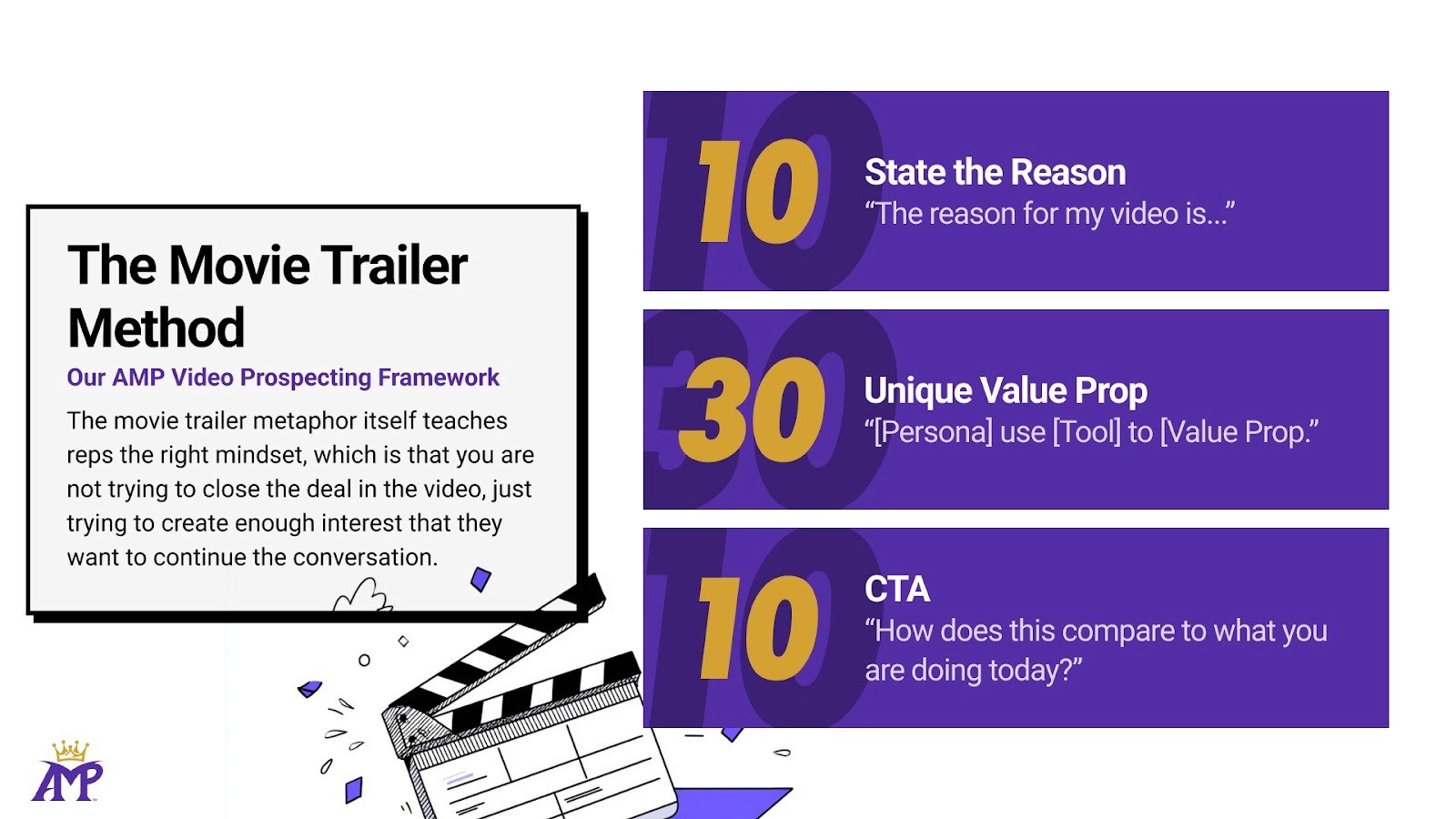
The structure within the movie trailer method is very simple called the 10-30-10. Ten seconds to state the reason, thirty seconds for your unique value proposition, and ten seconds for the call to action. Fifty seconds total is the goal and if you get to 35-45 seconds you are golden.
Let's break down each section.
The First 10 Seconds: State the Reason
The first ten seconds determine whether they keep watching or click away. You need to answer immediately… why did you make this video for me?
Open with your observation. The specific trigger event or insight that prompted your outreach. This proves the video is personalized and gives them a reason to care.
What to say:
"The reason for my video is I saw you just added two new sellers to the team."
"Hey [Name], noticed in the 10k report in the management’s comments that you all are focused on.."
"Quick video because I saw your post about pipeline forecasting challenges…”
What not to say:
"Hi, my name is [Name] and I work at [Company]." (They already know this and it’s obvious. It provides no context. Get to the point.)
"I wanted to reach out because we help companies like yours." (Generic. No observation.)
"Hope you're having a great day." (Complete waste of time.)
The first ten seconds should feel like a pattern interrupt. Something specific enough that they think "okay, this person actually looked at my situation and not an AI bot." That recognition earns them another thirty seconds.
The Middle 30 Seconds: Unique Value Proposition
The middle thirty seconds is where you deliver value. But we are not blindly pitching the product here. You're connecting your observation to a problem they might have and hinting at how others are solving it. Simply put we are sparking a conversation not pitch slapping them.
The structure that works: "[Persona] use [Approach] to [Value Proposition]."
This formula keeps the focus on them, not you. You're sharing what people like them are doing, not delivering a sales pitch about your features. The shift is subtle but significant.
Example script: "Typically when I see teams adding sellers like that, they're prepping for a bigger outbound push. A lot of VP of Sales in the cyber security space I've been talking to say the challenge is that new reps take forever to ramp, and the existing team is doing random activity without much coordination. What's been working for teams in your situation is building a systematic outbound approach centered around social selling that gets new reps booking meetings in weeks instead of months."
Notice what's happening here:
Context interpretation: "Typically when I see that, teams are prepping for..."
External validation: "A lot of VP of Sales in the cyber security space I've been talking to say..."
Problem acknowledgment: "New reps take forever to ramp..."
Solution hint: "What's been working is building a systematic approach..."
You're not talking about your company or your product. You're talking about their world and what others in similar situations are experiencing. This positions you as someone with insight to potentially solve that situation, not some random pitch bro.
The Final 10 Seconds: Call to Action
The last ten seconds should make the next step easy. Don't ask for too much and make it frictionless to say yes.
Effective closes:
"How does this compare to what you're doing today?"
"Not sure if this is relevant, but happy to share what's working for other teams if you're curious."
"Worth a quick conversation to see if any of this applies?"
Ineffective closes:
"Do you have 30 minutes this week?" (Too big an ask from a stranger.)
"Let me know when you're free to discuss." (Puts all the work on them.)
"I'd love to schedule a demo." (People feel friction when they hear a demo.)
The best closes are curiosity-based, not commitment-based. You're opening a dialogue, not demanding a meeting. If your video did its job, they'll want to continue the conversation.
Results
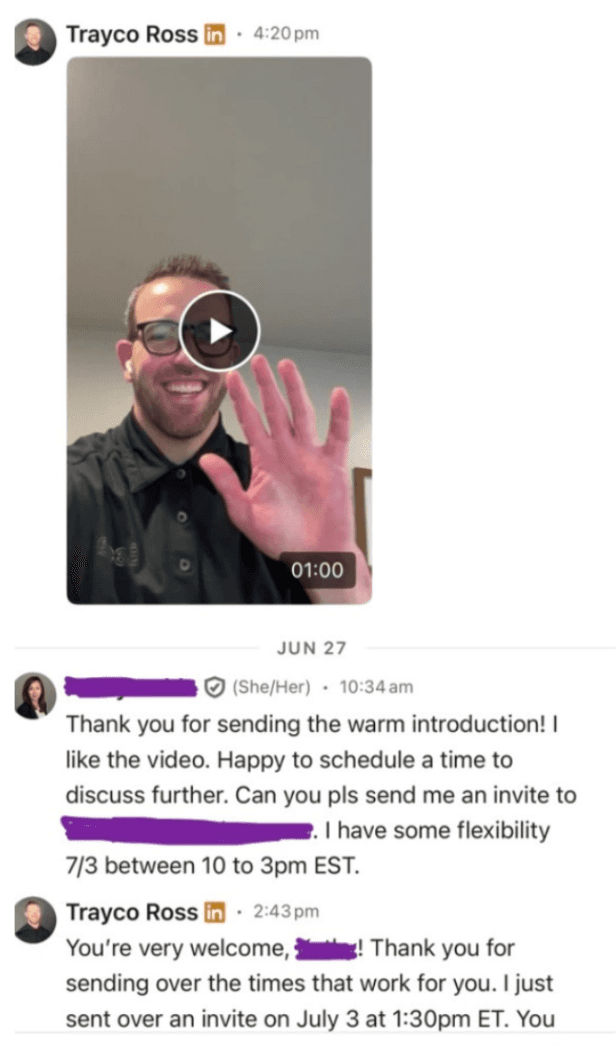
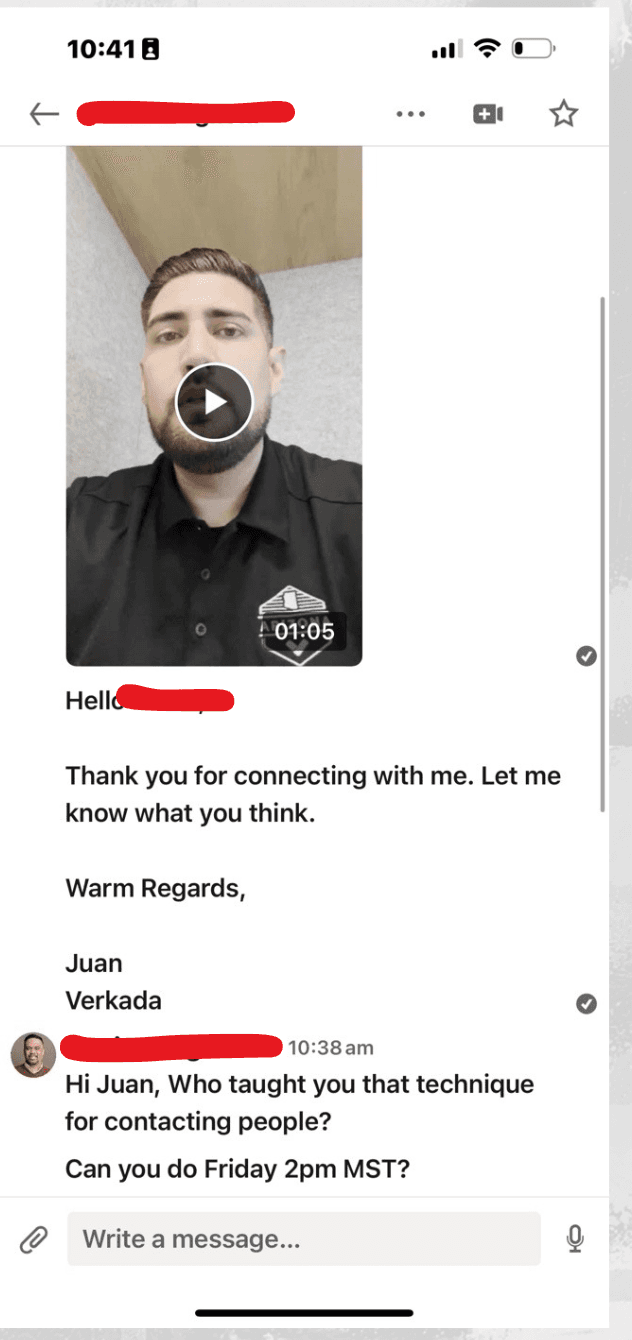
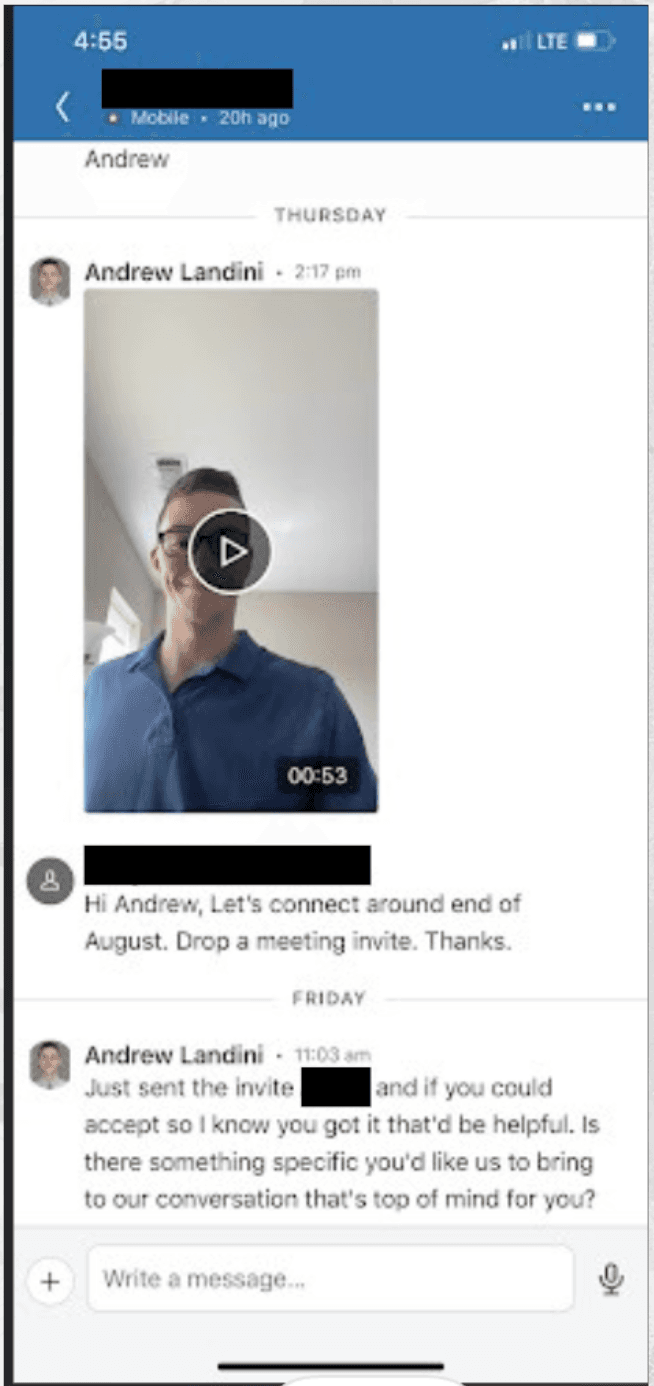
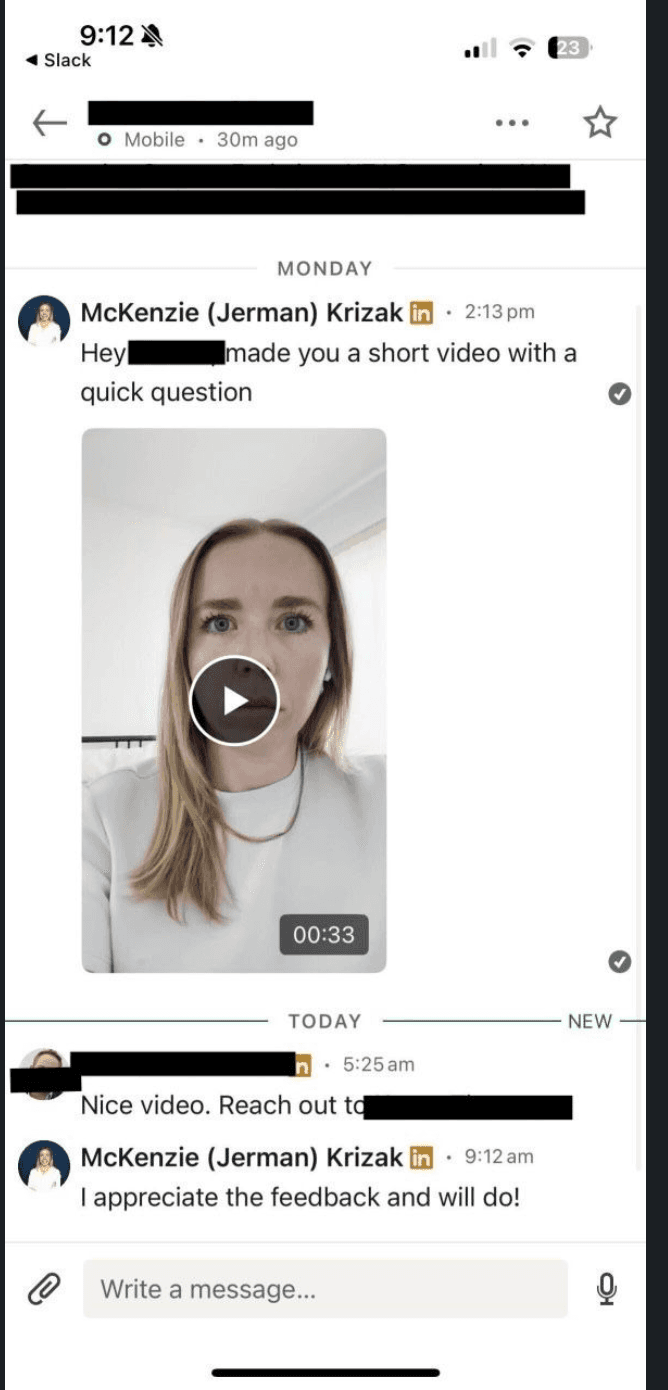
Now I know immediately for every leader and rep that reads this you are thinking, "Oh wait... Morgan... You have a brand, of course this works for you."
Good call out. That is why below I provided examples of how this works in real time. You might be wondering about the personas.. they are VP of Sales, HR leaders, CISO, and IT. All responded to the videos. That is to let you know it can and does work across personas.
Video vs. Voice Notes: When to Use Each
Now this is all about video yet I do want to comment on the voice note strategy. They each can serve different purposes. Understanding when to use each maximizes their effectiveness.
Use video when:
It's your first personalized touch after a connection request
Also good as a 3rd touch point in the LinkedIn DM
You have a strong visual observation to reference (their LinkedIn post, company news)
You're reaching a high-value prospect (VP or C-suite) where extra effort is justified
You want to create maximum pattern interrupt and memorability
The prospect hasn't responded to written-based outreach
Use voice notes when:
You don’t feel comfortable with videos but you want to try something different
You want to add a human touch without the production time of video
You're building familiarity over multiple touches in the same sequence
The prospect has already engaged and you're maintaining conversation
Voice notes are faster to record and feel more casual. I'll do them as I walk around Arizona in the afternoon. They work well for the second or third touch in a sequence after the video has established your face and voice. Think of voice notes as conversation continuers and videos as conversation starters.
Both video and voice prove humanity. Use video when you need maximum impact. Use voice when you need efficient human touches at scale.
Technical Setup for Professional Video
You don't need expensive equipment for effective video prospecting. We are not filming a Mr Beast video here. You need good enough setup that your video looks intentional, not accidental.
Camera: Your laptop webcam or phone camera works fine.
The key is positioning:
Camera at eye level, not looking up your nose from below.
Stack some books under your laptop if needed.
Lighting: Face a window or put a light source in front of you, not behind you. Backlighting makes you look like a shadow. Natural light from a window is the easiest solution. A simple ring light is worth the $30 investment if you're doing video regularly.
Audio: Clear audio matters more than video quality. Use earbuds with a microphone or a simple external mic. Avoid recording in echoey rooms, remove background noise and find a quiet space to do this.
Background: Keep it simple and uncluttered. A plain wall or a bookshelf works here. Avoid anything distracting or unprofessional behind you. The prospect should focus on your face, not your messy office.
Tools: Sendspark and Vidyard are the most popular platforms for sales video. Both offer free tiers, thumbnail customization, and tracking to see when prospects watch. However, I would tell you to use your iPhone or Android (Sorry to hear if you have this phone by the way) to send LinkedIn DMs way easier to do. It works better because it’s native to LinkedIn so the prospects don’t have friction and have to click out.
To start, record a test video and watch it back. Check all your audio, visuals, etc to make sure you stand out.
Common Video Mistakes That Kill Response Rates
After reviewing thousands of prospecting videos, these are the mistakes that consistently kill response rates:
Reading from a script. Prospects can tell instantly when you're reading. Your eyes move, your voice sounds flat and ultimately you sound like a robot. Provide your team with a formula then you can go execute.
Too long. The sweet spot is 45-60 seconds. Every second over a minute reduces completion rates. The best way to tell your team to think about this is it’s a cold call that happens to have your face in it. Makes everyone feel more comfortable and confident to do it.
Pitching too hard. Video isn't a demo. It's a conversation starter. If you spend your thirty seconds talking about your product features, you've missed the point. Talk about their world, not yours.
Poor technical quality. Bad lighting, muffled audio, or awkward framing signals carelessness. I have done this in the past and it will make people not want to engage with you because you feel unprofessional.
No clear next step. Ending with "anyway, just wanted to reach out" leaves them nowhere to go. Close with the exact next steps and don’t waffle.
Integrating Video Into Your Multi-Channel Cadence
Video works best as part of a coordinated multi-channel approach, not as a standalone tactic.
Where video fits in the outbound system:
1. EMAIL:
A common question I get is when to send video in email. Here's my take, don't send it as your first touch. You risk getting flagged as spam or blacklisted. I very confident NONE of you want that.
Instead, use what I call a "heat check."
If you're using a tool like Gong Engage, Salesloft or Outreach, you get alerts when someone opens your email. When an email hits three or more opens, that's a high-intent signal. That's when you send the video.
Why?
Because they're clearly interested, they keep coming back to your message. Now you get in front of them with your face while they're warm.
When my SDR team did this, we saw a 30% reply rate on those videos.
2. LINKEDIN:
As mentioned earlier, video works great as a third touch in the LinkedIn DMs if you're not leading with it.
Here's the sequence flow
You send a written message
Then a voice note
Then close with a video.
By that third touch, they've seen your name twice and now they see your face. It’s a great way to be pleasantly persistent in your outbound flow.
3. PHONE/VOICEMAIL:
For those of you leading SDR teams or running sales orgs, your reps are probably already making calls. Here's a way to tie video and phone together.
Instead of being reactive, be proactive.
Leave a voicemail that references the video you're about to send: "Hey, I'm about to send you a video on LinkedIn keep an eye out for it."
Now you've got a multi-touch approach that feels human instead of automated. The voicemail sets up the video and gets the prospect excited to see it because it is a pattern interrupt.
When we do this with clients at AMP Social, we see about a 10% increase in reply rates on average.
Measuring Video Prospecting Performance
Track these metrics to understand how your video prospecting is performing:
Response rate: What percentage of video recipients respond? Compare this to your written-only response rates. Video should significantly outperform. If it doesn't, review your content, delivery and time you are sending.
Meeting conversion: Of people who respond to videos, how many convert to meetings? We call this the positive reply rate. High response rates but low meeting conversion suggests your videos are interesting but not relevant enough.
Time investment: How long does it take you to research and record each video? Track this to understand your efficiency. As you improve, video creation should get faster without sacrificing quality.
Review a sample of your videos weekly as a sales team. Watch them back and evaluate: whose videos are doing better, what replies are we getting, what time of day is working. You all need to be scientists in the lab testing and formatting based on what works best.
Making Video Your Competitive Advantage
Video prospecting separates sellers who are willing to be uncomfortable from sellers who hide behind automation. That willingness is your advantage. If you are afraid, that is ok. Lean into that feeling and overcome it.
You can eliminate that fear as a team by implementing the Movie Trailer Method and a simple structure to execute with the 10-30-10. Ten seconds to state your observation, thirty seconds to deliver relevant value, ten seconds to close with curiosity. Keep it under a minute and personalized from a human perspective.
Most B2B sales teams will never do this. They'll stick with email templates and AI-generated messages, competing in crowded channels where everyone sounds the same. Let them. While they blend into the noise, your team will stand out by showing their faces and proving they did the work.
Video isn't harder than other outreach. It's just more vulnerable. That vulnerability is exactly what makes it effective. In a world where buyers are drowning in automated spam, a real human on camera is refreshing.
Start with five videos this week. Follow the 10-30-10 structure. Track your results. Watch the response rates climb.
AMP Social teaches B2B sales teams how to build an outbound system centered in social selling and other video prospecting frameworks. Video is one component of our complete multi-channel system where LinkedIn, phone, and email work together to book meetings. If your team isn't using video or your current videos aren't getting responses, we should talk. Learn more at theampsocial.com.
© 2025 LinkedIn Pipeline Generation. All rights reserved.
Privacy Policy
Terms of Service